-
Shop
- Advanced Technologies
- AI Skills
- Apple Accessories
- Armani
- Bathroom
- Best-Sellers
- Calvin Klein
- Car Accessories
- Car Buying & Ownership
- Confidence
- Dating & Social Skills
- Digital Resources
- AI & Technology
- Beauty
- Electronics & Technology
- Emotional Intelligence
- Home Styling & Organization
- Kitchen & Recipes
- Mindfulness
- Mindset
- Online Business
- Parenting & Child Development
- Personal Style & Fashion
- Pet Lifestyle & Wellness
- Positive Thinking
- Productivity
- Self Confidence
- Sleep Improvement
- Smart Life with AI
- Stress Management & Relaxation
- Wellness
- Yoga & Mind-Body Practices
- Education & Learning
- Family & Parenting
- Fashion
- Furniture
- Gadgets
- Health & Beauty
- Health & Wellness
- Home & Garden
- Home Decor
- Home Electronics
- Jewelry
- Kids & Babies
- Kitchen
- Legend Footwear Brands Collection
- Lighting
- Luxury Brands Collection
- Nike
- Patio, Lawn & Garden
- Personal Growth
- Pet Care
- Pet Supplies
- Pets
- Smart Amazon Shopping
- Sport & Outdoors
- Travel
- Travel & Adventure
- Wealth
- Wealth Building
- Budgeting & Saving
- Cryptocurrency Investing
- Debt Management
- Entrepreneurship & Business Growth
- Family Finance & Budgeting
- Financial Independence
- Financial Mindset & Psychology
- Financial Planning
- Frugal Living & Expense Hacks
- Goal Setting
- High-Income Skills
- Investing Basics
- Leadership
- Motivation
- Networking & Mentorship
- Passive Income Strategies
- Real Estate Investing
- Side Hustles
- Stock Market Investing
- Popular
- Best deals
Sleek L-Shaped Glass Desk with Steel Frame & Keyboard Tray
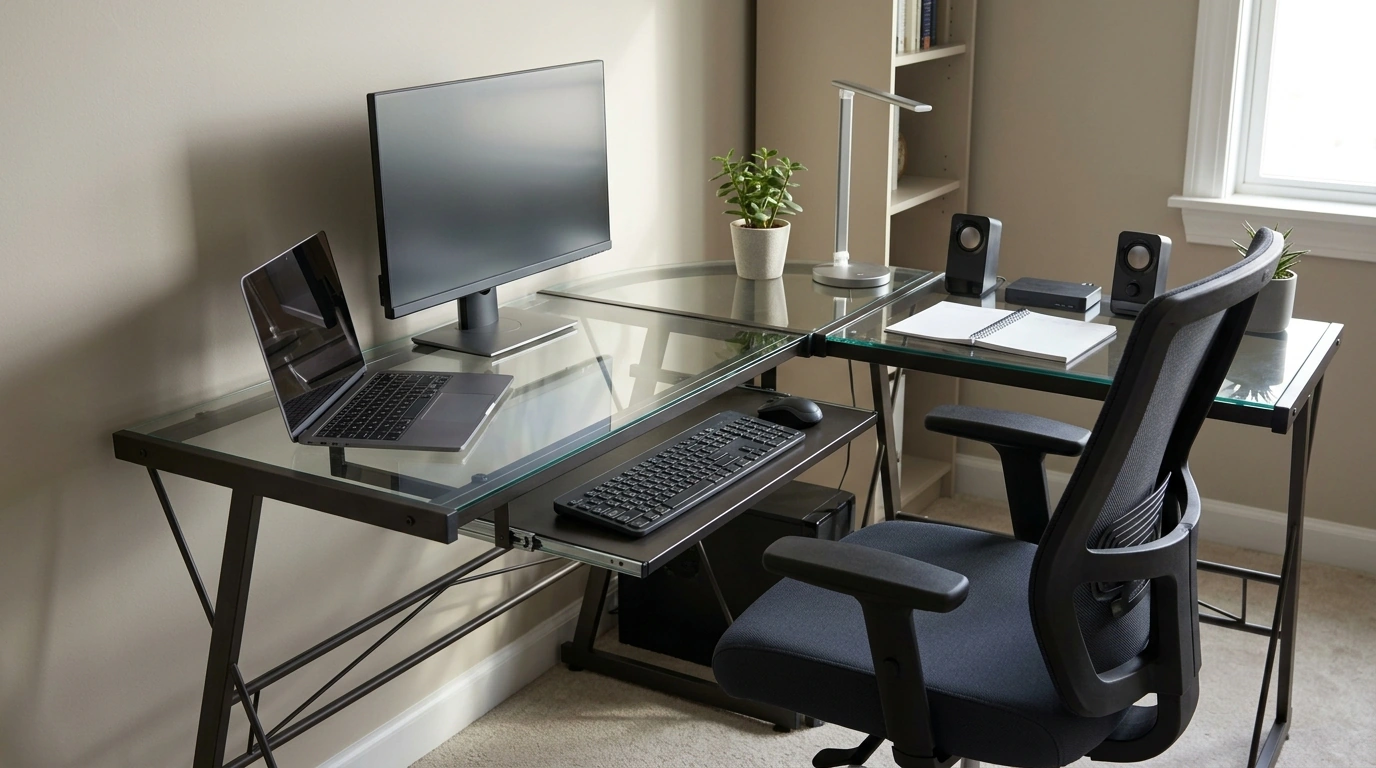
Modern L-Shaped Tempered Glass Desk with Steel Frame and Pull-Out Keyboard Tray: A Clean Corner Workstation
A corner desk can reclaim floor space while creating distinct zones for screens, writing, and accessories. This modern L-shaped design pairs a tempered glass top with a steel frame and a pull-out keyboard tray to keep the setup open, durable, and visually light—ideal for work, study, or gaming in compact rooms.
What Makes This Desk Different
- L-shaped footprint for better zoning: The main run can hold your monitor and daily essentials, while the return keeps paperwork, a lamp, speakers, or a docking station within reach without crowding the primary surface.
- Tempered glass for a crisp, modern look: Tempered glass is designed to handle everyday use better than standard glass, offering improved resistance to minor impacts and heat from typical desk items (like laptops and warm mugs).
- Steel frame stability without bulk: A steel base supports monitors and accessories while keeping the overall profile clean—helpful in small rooms where heavier-looking furniture can make the space feel tighter.
- Pull-out keyboard tray to open up the desktop: Sliding the keyboard off the main surface can free room for writing, sketching, or spreading out documents, and it can support healthier posture when adjusted correctly.
Quick Specs and Fit Check
Before committing to an L-shaped glass desk, take a few measurements and think through the way you actually move through the room. A couple of minutes with a tape measure can prevent common placement headaches—like blocked doors, awkward chair angles, or monitor arms that won’t clamp properly.
Setup checklist before buying
| What to measure | Why it matters | Quick tip |
|---|---|---|
| Corner space (width x depth) | Ensures the L fits without blocking doors or drawers | Tape the footprint on the floor to confirm chair swing |
| Chair clearance behind desk | Prevents cramped seating and improves ergonomics | Aim for enough room to roll back and stand comfortably |
| Monitor base/arm clamp area | Avoids clamp interference on glass edges and frame bars | If using arms, verify clamp depth and edge thickness |
| Keyboard tray height and legroom | Comfort during long typing sessions | Keep forearms roughly parallel to the floor when typing |
| Cable reach to outlets | Reduces visible wires and tension on connectors | Mount a power strip under the desk when possible |
For general workstation posture guidance, review the recommendations from OSHA’s Computer Workstations eTool and Mayo Clinic’s office ergonomics guide. If this desk will be used in a shared space or near kids, it’s also smart to follow CPSC furniture safety guidance for stable placement and safe loading.
Everyday Use: Work, Study, and Gaming
- Work-from-home: Place your monitor(s) on the main run and keep the return for a notebook, planner, phone stand, or docking station. This separation helps keep “screen work” and “paper work” from competing for the same square footage.
- Study setup: Keep the center of the main surface clear for textbooks and writing. The return can hold supplies, a lamp, and a small organizer so you don’t constantly reshuffle items during study sessions.
- Gaming: Set the display on the main run and reserve the return for a console, controller charging, a small mixer, or streaming gear. An L shape can also make it easier to keep snacks and drinks away from your keyboard/mouse zone.
- Shared spaces: A glass top tends to feel visually lighter than wood or laminate, helping a room look less crowded. If glare or tapping sounds bother you, a desk mat can reduce reflections and soften noise.
Comfort and Ergonomics Tips for a Keyboard Tray
Care, Cleaning, and Long-Term Durability
Assembly and Placement Notes
Product Options Available Now
For a clean, space-saving corner setup, the Modern L-Shaped Tempered Glass Computer Desk with Steel Frame and Pull-Out Keyboard Tray is available now and built to keep your workspace open and organized while providing a dedicated typing surface.
If long screen sessions are part of your routine, consider pairing your setup habits with Screen Headaches Solved – A Practical Digital Guide to Headaches From Screen Overuse, Eye Strain Relief & Smart Screen Habits to help fine-tune comfort and reduce fatigue during extended work or gaming blocks.
FAQ
Is tempered glass strong enough for dual monitors?
Tempered glass is designed to be stronger than standard glass for everyday use, and it can work well with dual monitors when weight is distributed thoughtfully. Keep heavier items positioned over frame-supported areas and verify that any monitor stand or clamp is compatible with the desk’s edge and thickness.
Does a pull-out keyboard tray improve comfort?
A keyboard tray can improve comfort by helping keep elbows near a 90° angle and shoulders relaxed when the tray height is set correctly. The main tradeoffs are potential reductions in legroom and mouse space, so it’s worth checking tray height and width for your typing style.
How should an L-shaped desk be positioned in a room?
Place the desk so the L fits the corner without blocking walkways, and orient the return to match your dominant-hand workflow. Also consider window glare on the glass surface and monitor, plus outlet access for clean cable routing and easy power-strip placement.
Recommended for you
Boss Men’s Black Leather Wallet: Slim, Polished EDC
Sep 19, 2026










Leave a comment